
AI agents can't buy what they can't read
AI agents read your site through its accessibility tree, the same structure screen readers use. That makes WCAG work commercially interesting for the first time. Here's what agents read, what the research does and doesn't prove, and why the AI framing is a trap worth avoiding.
 Tim Gaunt
Accessibility has spent twenty years being sold as a compliance job, and it has had a miserable conversion rate. The businesses that took it seriously mostly did so out of decency, or after a legal scare. Everyone else carried on shipping div soup and hoping nobody with a screen reader ever tried to check out.
That is starting to change, and for a slightly uncomfortable reason.
The machines are now using the same door.
What an agent reads
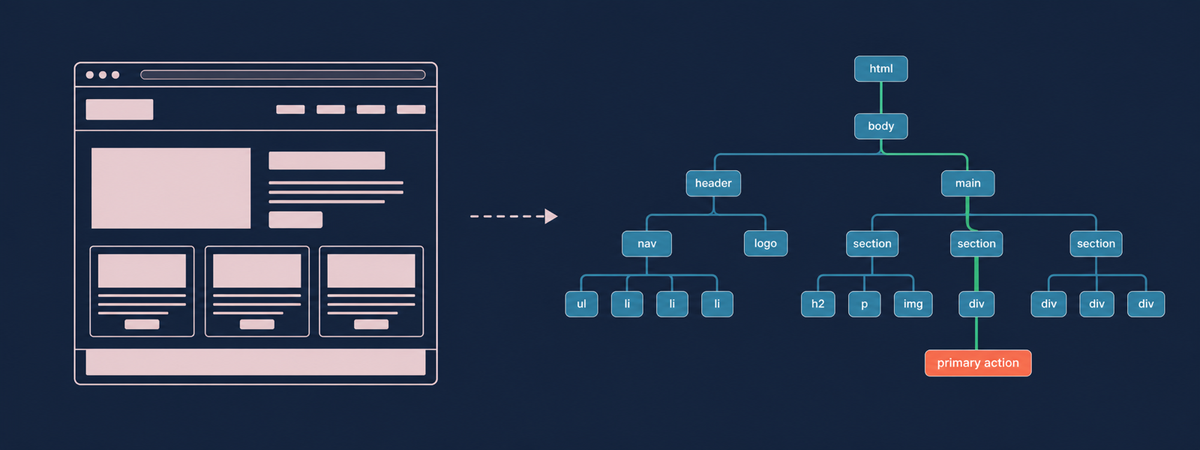
When an AI agent visits your product page, it isn't looking at your product page. It can't appreciate your hover states or your carousel. What it reads is the accessibility tree, the structured map every browser builds alongside the DOM to describe what each element is and what it's called. Screen readers have run on it for decades.
OpenAI is unusually blunt about this in its publisher guidance, which states that making your website more accessible helps its Atlas agent understand it better. The same documentation confirms Atlas interprets page structure through ARIA labels and roles, and points developers at WAI-ARIA practice for buttons, menus and forms. Microsoft went the same way with Playwright MCP, its official server for browser automation, where the model is handed an accessibility snapshot of the page and no screenshot at all.
The engineering logic is hard to argue with. Your DOM might hold thousands of nodes, most of them wrappers and layout scaffolding that mean nothing to anyone, whereas the accessibility tree strips all that back to the handful of things a user can act on, which is a far cheaper object to push into a context window and a far more stable one to plan against. Vision-led approaches do work. Anthropic's computer use counts pixels on a screenshot to find a button, and it finds it. It's just slow, and it falls over the moment your layout shifts under it.
So the thing you used to fix to pass an audit is now a live interface into your business.
The stat everyone is misquoting
Researchers from UC Berkeley and the University of Michigan published the A11y-CUA dataset at CHI 2026. They ran Claude Sonnet 4.5 as a computer-use agent across sixty everyday tasks under three conditions. With normal access it completed about 78% of them. Restricted to keyboard-only navigation, that fell to roughly 42%. At a 150% magnified viewport, 28%.
Those numbers are being cited as proof that inaccessible sites break agents. They don't show that. The study was constraining the agent, not the website. The researchers wanted to know whether an agent can work inside assistive technology conditions, so that a blind user might supervise one, which is a different question and a more interesting one.
What the figures do tell you is how heavily today's agents lean on the visual, mouse-driven path, and how sharply they degrade when they're pushed onto the keyboard route instead. Which is the route semantic structure exists to support. Agents depend on your markup, then. When it's thin they fall back on guessing, and guessing at a checkout gets expensive for everybody.
Where this bites in commerce
A <div onclick="addToBasket()"> renders identically to a button and communicates nothing. No role, no name, no state. A person clicks it happily. A screen reader user hits a wall. An agent has to infer, from surrounding text and a class name, that this grey rectangle is probably the thing that adds a product to a basket.
Multiply that across a mid-market catalogue and it stacks up fast: variant pickers built as styled spans, quantity steppers with no accessible name, icon-only controls holding nothing but an SVG and a tooltip that only fires on hover. Checkout is usually where it gets worst, since that's where fields end up identified by placeholder text alone, and an agent trying to work out which box wants the work email address has nothing to go on but position.
Then there's rendering. Browser-based agents run on Chromium and will execute your JavaScript, but plenty of AI crawlers and indexers won't. If your price, stock position and delivery promise only appear once a client-side fetch resolves, a chunk of agent traffic will never see them at all. Server-rendered markup sidesteps the problem, which is one of the quieter arguments for the sort of stack we tend to build on: Umbraco renders on the server by default, so you'd have to work quite hard to hide your product data from a machine.
The practices that fix all of this are the ones the accessibility community has been asking for since before any of us had heard of an LLM. Native elements where native elements exist. Labels tied to their inputs, headings in a sane order, landmarks so a machine can tell your nav from your main content. None of it is new, which is either encouraging or slightly embarrassing depending on the state of your codebase.
The trap
Here's where I'd push back on some of the content appearing around this topic, including a fair bit written by people who sell accessibility tooling.
The argument "do accessibility so the robots can shop" is a useful lever and a terrible reason. Accessibility is for the fourteen million or so disabled people in the UK who are trying to use your website. The agent benefit is a happy side effect of having built the thing properly. Let the AI framing become the justification and you'll end up optimising for the robot while quietly reintroducing barriers for the humans, which is roughly how we got inaccessible sites in the first place.
That distinction has practical teeth. When OpenAI told publishers to add ARIA tags, a fair number of accessibility engineers winced, and they were right to. The first rule of ARIA is to avoid it where a native element already does the job. Put role="button" on a div and you get the label; you still have to write the keyboard focus, the Enter and Space handling, and everything else a real button hands you for free. Read OpenAI's line as licence to sprinkle ARIA over a broken component and you'll ship something that announces itself beautifully to an agent and stays unusable for anyone on a keyboard.
Semantics first, then. ARIA where native HTML can't express what you need.
Much the same goes for the overlay tools that patch accessibility at runtime through injected JavaScript. Whatever you make of them on the compliance question, and opinions there are strong in both directions, they don't repair the markup underneath, so they do very little for the agent reading your accessibility tree.
The clock was already running
The European Accessibility Act became enforceable on 28 June 2025, and it reaches UK businesses selling online to EU consumers regardless of where the company sits. Microenterprises are out of scope, though the threshold is low: broadly, under ten staff and under €2m turnover. Services already on the market get until June 2030. New ones don't.
Enforcement hasn't been theoretical. French disability groups served formal notices on four major grocery retailers within days of the deadline, then went for emergency injunctions in the November when remediation fell short. Sweden opened market surveillance that October. Penalties are set member state by member state, so the exposure varies depending on where your customers are.
At home the Equality Act 2010 has always applied to private businesses, it just never named a technical standard. WCAG 2.2 AA is what the public sector is held to, and it's what any sensible assessment now measures against.
What I'd do about it
You don't need a new toolset to find out where you stand. Open Chrome DevTools, find the Accessibility pane, and walk your checkout one step at a time, asking at each step whether you could identify the next action from the tree alone with the rendered page hidden. If you can't, an agent can't either.
Then do the same flow on a keyboard, no mouse. Most teams learn something unpleasant about their basket inside two minutes.
Automated scanners will pick up missing labels, empty buttons and broken heading hierarchies quickly, and that's a decent first pass. What they won't tell you is whether a purchase can actually be completed, so run the manual checks on your highest-intent pages first. Checkout, search, account, then everything else.
The teams that did this work five years ago are about to look prescient for reasons they never argued for. Everyone else has a remediation project sitting there, and it's cheaper to start it now than after an agent-driven referral channel makes the gaps obvious.
We build and maintain e-commerce platforms that have to keep working for years after launch, which tends to concentrate the mind on markup quality. If you want a view on how your current site reads to a screen reader or an agent, we're happy to look at a couple of key journeys and tell you what we find.