
Error running Scratch Indexer in Sitefinity 15.3+ and uCommerce 9
We recently hit and issue when looking to upgrade a Sitefinity instance running uCommerce 9.7 to 15.3 and by extension 15.4
This presents itself in the form of an error when running the scratch indexer, which basically breaks the commerce engine and all site widgets when it cannot compete successfully.
In Sitefinity, if the scratch indexer cannot execute, you will see all page widgets are broken when the site loads, with each giving the dreaded error message: Exception Occurred executing the controller. Check Log for details
This is usually caused by missing indexes and so the fix for this is usually to execute the scratch indexer code on system boot similar to:
private void Bootstrapper_Bootstrapped(object sender, EventArgs e)
{
    //NOTE: It is not recommended you do this in production as it will block the website loading
    var indexDir = System.Web.Hosting.HostingEnvironment.MapPath("~/App_Data/Ucommerce/Indexes");

    if (Directory.Exists(indexDir) && Directory.GetFiles(indexDir).Any())
{ return; }

    var scratchIndexer = Ucommerce.Infrastructure.ObjectFactory.Instance.Resolve<Ucommerce.Search.Indexers.IScratchIndexer>();

    scratchIndexer.Index();
}
or to go to your back office, then to uCommerce > Settings > Search > Index Everything from scratch.
Whichever route you take, from Sitefinity 15.3 onwards you will be presented with a myriad of error messages as you try and work your way through this.
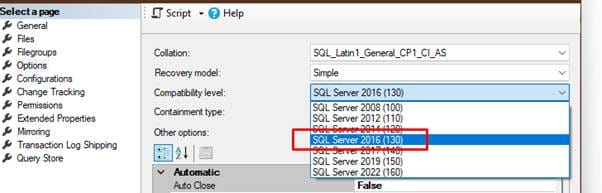
The first thing you may see is that Sitefinity often keeps its database compatibility level as low as possible, which by default is 100. When this is the case, you will get an “Invalid Object STRING_SPLIT” error. This is because the UCommerce Lucene Indexer requires this SQL function to execute, which only exists on SQL Databases which have a compatibility level of 130 or greater. This is an easy fix, you just need to edit your SQL database and set the Compatibility level under Properties > Options in Sql Server Management Studio and reboot the site.
The Issue
Once that has been resolved, you will see the next error, which is the start of the Lucene incompatibilities that Sitefintiy 15.3 onwards now has with uCommerce 9.
It starts with this error:
System.MissingMethodException: Method not found: 'System.String Lucene.Net.Documents.DateTools.DateToString(System.DateTime, Resolution)'.
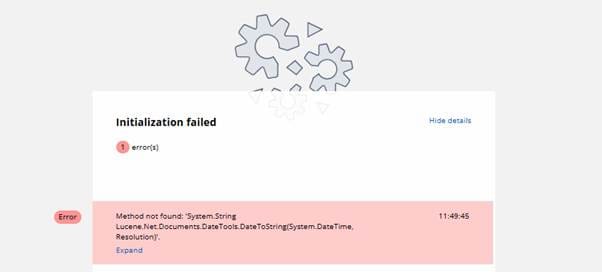
The cause for this, is that Sitefinity 15.3+ has moved to using Lucene v4.8-beta00017 whereas Ucommerce 9 still uses v3.0.3.
The resolution here is one of 3 options
- Move to Elastic Search for uCommerce. They do provide and ElasticSearch implementation that can be used instead
- Make uCommerce work with Lucene v4.8-beta00017
- Move to a completely custom implementation with a different provider such as Azure Search, or even go back to the older choice of RavenDB instead, which was used in previous versions of uCommerce before they moved to Lucene.
We opted for Option 2 here as Lucene is already used by Sitefinity and it seems sensible to want to keep using the same search provider for both and not to have to set up an addition Elastic Search instance to then run just for uCommerce or indeed any other instance of another search provider. RavenDb and Azure search would also require a standalone instance to do their processing.
Our Resolution
Digging into what is causing this error, it becomes apparent that Lucene v4 has changed how it implements the DateToString method, and so the signature is different.
Lucene v3 uses a static class with properties to represent the resolution (https://lucenenet.apache.org/docs/3.0.3/dc/de7/class_lucene_1_1_net_1_1_documents_1_1_date_tools_1_1_resolution.html ) in Lucene v4 this has been changed to an enum (https://lucenenet.apache.org/docs/4.8.0-beta00005/api/Lucene.Net/Lucene.Net.Documents.DateTools.Resolution.html)
Here in the v3 documentation, you can see the original signature implementation ( https://lucenenet.apache.org/docs/3.0.3/d4/db9/class_lucene_1_1_net_1_1_documents_1_1_date_tools.html#afa823264c0479cc2bc071ff187948d7f )
Naturally, if this was the fix alone it would be easy enough to change, but that causes a cascading effect where other compiled files in the Ucommerce.Search.Lucene.dll then need to be updated to work with this.
In some instances, we can override the implementation and it’s easy enough to work around, but in other places, this method is called in a static method or class that cannot be overridden meaning the whole thing must be overridden and changes made.
In total these are all the files that needed to be changed to allow uCommerce to work with Lucene v4
- BatchIndexer.cs
- Deserializer.cs
- DiskIndex.cs
- IndexMissingException.cs
- IndexWriter.cs
- Search.cs
- SearchProvider.cs
- Serializer.cs
- NumericRangeQuery.cs (this is actually from Ucommerce.Search.dll) but relies on the same DateToString when working with range facets, so have been overridden here and usages updated in the Lucene48Search.cs, which replaces Search.cs
We have gone through and made all the changes and have uCommerce 9 working with Sitefinity 15.3+ and to save you the hassle have provided the following uCommerce App that can be used in place of the existing Ucommerce.Search.Lucene app that ships with uCommerce 9: https://github.com/TheSiteDoctor/uCommerce-v9-Lucene48-Overrides-App
To install, it's very simple.
- Unzip Ucommerce.Search.Lucene48.zip
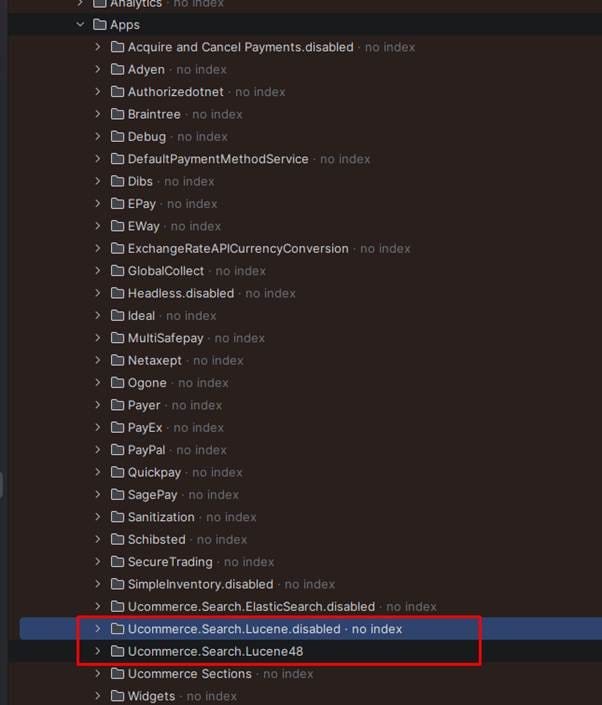
- Drop the Ucommerce.Search.Lucene48 folder inside the zip file into the wwwroot/Ucommetce/Apps directory
- Ensure you rename the existing Ucommerce.Search.Lucene app to Ucommerce.Search.Lucene.disabled
Run your site and you should have the Scratch Indexer working again as expected.
Having issues with Sitefinity and Ucommerce? TSD specialises in Sitefinity e-commerce solutions with a strong background in Ucommerce. Contact us today to see how we can help.